The Problem
You walk into the parts store. The check engine light is on. The clerk offers to "scan it for free" — but they hand you a printed sheet with a code and a list of possible causes that reads like a menu of everything that could possibly be wrong with your car. Then they try to sell you a catalytic converter, an oxygen sensor, and a can of fuel system cleaner.
You know there's a better way — but there are a hundred scan tools on Amazon. Some are $15. Some are $150. Some are $1,500. What does each one actually do? What's the difference between reading a code and diagnosing a problem?
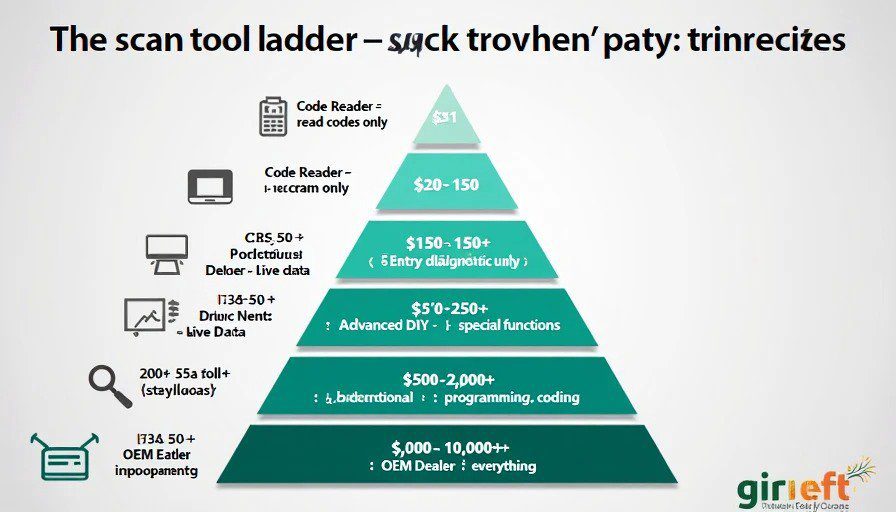
This guide breaks down scan tools by price tier, tells you what you actually get at each level, and helps you buy the right one for your garage.
The Fundamentals — What You Need to Understand First
Before we talk about tools, you need to know what you're paying for.
What a Scan Tool Actually Does
Function | What It Means | Who Needs It |
|---|---|---|
Read codes | Pulls the DTC (Diagnostic Trouble Code) from the ECU. Gives you the code number and a description. | Everyone |
Clear codes | Erases the codes and turns off the check engine light. It doesn't fix the problem — it just resets the light. | Everyone |
Live data | Shows real-time sensor readings while the engine is running. This is where diagnosis actually happens. | DIYers who want to diagnose |
Graphing | Displays live data as a waveform, not just numbers. Makes it easy to spot sensor problems. | Serious DIYers and professionals |
Bidirectional control | Allows you to command components (fuel pump, cooling fans, solenoids) to turn on or off. | Advanced DIYers and professionals |
Programming / coding | Allows you to update firmware, program new modules, or code replacement parts to the car. | Professionals (or very advanced DIYers) |
Special functions | Does things like ABS bleed, battery registration, TPMS relearn, injector coding, etc. | Depends on the function |
The Most Important Thing to Know
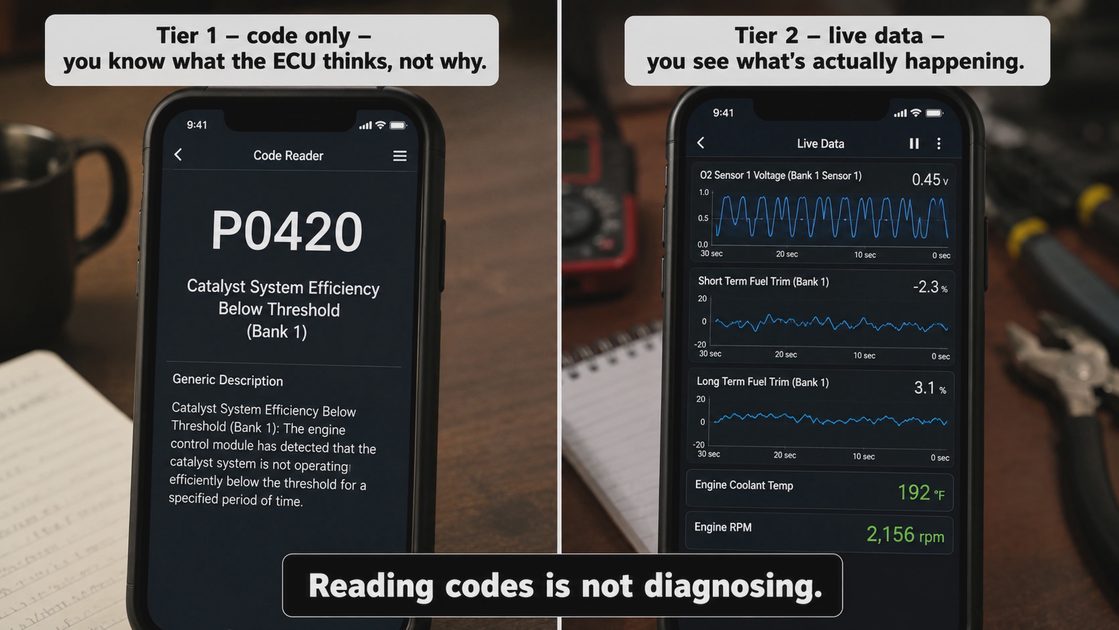
Reading codes is not diagnosing.
Reading a code tells you what the ECU thinks is wrong. It doesn't tell you why it's wrong. A P0420 code doesn't mean "replace the catalytic converter" — it means "the catalytic converter isn't working as efficiently as expected." That could be caused by a bad oxygen sensor, an exhaust leak, a misfire, or actually a bad converter.
Diagnosing requires live data and understanding the systems. The tool is just a window into what the ECU sees. You still have to interpret it.
Tier 1: Code Readers — $15–$50
What You Get
Feature | Supported? | Notes |
|---|---|---|
Read codes | ✅ | Basic DTCs (P0xxx, P1xxx) |
Clear codes | ✅ | Resets the check engine light |
Live data | ❌ | None |
Graphing | ❌ | None |
Bidirectional | ❌ | None |
Special functions | ❌ | None |
Typical Products
Basic OBD-II Bluetooth dongles (ELM327-based)
Simple handheld code readers (Innova, Autel, Actron entry-level)
$15 Amazon specials
What You Actually Unlock
The ability to know the code number. Instead of going to the parts store and trusting their printout, you can read the code yourself and look it up.
The ability to clear a code (temporarily). This is useful for turning off a light after a repair — but it doesn't fix anything.
What You Don't Get
No live data. You can't see what the sensors are doing. You can't see fuel trims, O₂ sensor voltages, coolant temperature, or anything else that matters.
No diagnostic capability. You can read a code, but you can't diagnose it.
Who Should Buy This
The absolute beginner who just wants to know what the check engine light is for
Someone on a very tight budget who will use the tool once or twice a year
Someone who just wants to clear a code to pass an inspection (and doesn't care about the underlying problem)
The Honest Take
This tier is limited. A $15 code reader tells you the same thing as the free scan at the parts store — but you can do it in your driveway. It's better than nothing, but it's not a diagnostic tool. If you buy one of these, you're buying a convenience, not a capability.
Recommendation: Don't spend more than $30 on this tier. If you're going to spend $50, move up to Tier 2.
Tier 2: Entry-Level Diagnostic Scanners — $50–$150
What You Get
Feature | Supported? | Notes |
|---|---|---|
Read codes | ✅ | Full DTC support including manufacturer-specific codes |
Clear codes | ✅ | Yes |
Live data | ✅ | Basic PIDs (parameters) — RPM, coolant temp, O₂ voltage, fuel trims, etc. |
Graphing | ⚠️ | Sometimes yes, but usually basic |
Bidirectional | ❌ | No |
Special functions | ⚠️ | Some offer basic ABS bleed or oil reset on certain makes |
Battery | ✅ | Rechargeable, built-in |
Typical Products
Autel AutoLink AL319 (~$60)
Innova 3100/3120 (~$70–$90)
Launch CRP123 (~$120)
BlueDriver (~$100) — Bluetooth phone-based, excellent live data
OBDLink MX+ (~$120) — Bluetooth, excellent for live data and graphing via apps
What You Actually Unlock
Live data streaming. You can see what the ECU sees in real-time. This is where diagnosis becomes possible.
Better code definitions. You get descriptions for manufacturer-specific codes, not just generic ones.
Graphing (on some tools). You can see sensor waveforms, which helps diagnose intermittent issues.
Basic special functions (on some). Oil reset, ABS bleed, or EPB (electronic parking brake) service mode — but not on all tools and not on all cars.
What You Don't Get
Bidirectional control. You can't command a component to turn on or off to test it.
Full special functions. This tier usually only covers basic maintenance reset functions.
Module programming. No coding, no firmware updates, no replacement module programming.
Who Should Buy This
The serious DIYer who wants to actually diagnose problems, not just read codes
Someone who works on multiple vehicles and wants to understand what's happening
Someone who's comfortable with an app (if using BlueDriver or OBDLink)
The Honest Take
This is the sweet spot for most home garage mechanics. For $100, you get live data and the ability to actually understand what's happening. You can see fuel trims, O₂ sensor switching, coolant temp, and misfire counts. You can diagnose a P0420 instead of guessing at a catalytic converter. You can see that your upstream O₂ sensor is lazy and replace it.
Recommendation: If you're a DIYer who does your own repairs, spend at least $100 here. This tier pays for itself on the first diagnosis.
Tier 3: Advanced DIY / Entry-Level Professional — $150–$500
What You Get
Feature | Supported? | Notes |
|---|---|---|
Read codes | ✅ | Full DTC support, including manufacturer-specific |
Clear codes | ✅ | Yes |
Live data | ✅ | Full PID list, often with graphing |
Graphing | ✅ | Good waveform graphing, multiple sensors at once |
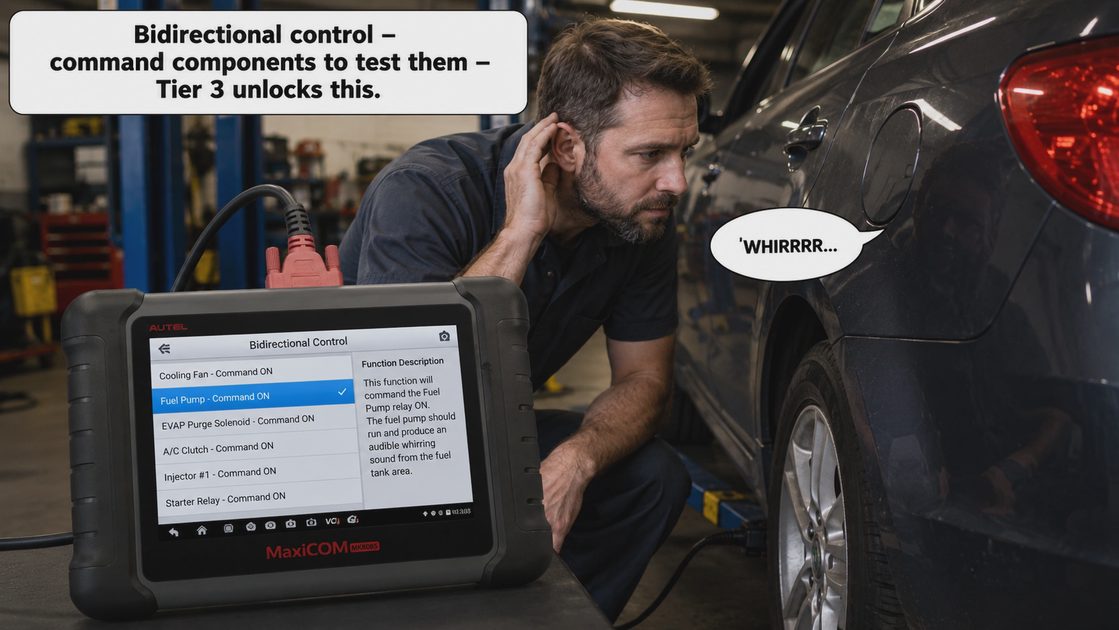
Bidirectional | ✅ | Yes — can command components (fuel pump, fans, solenoids, etc.) |
Special functions | ✅ | ABS bleed, injector coding, battery registration, TPMS relearn, etc. |
Module coverage | ✅ | Multiple modules (engine, transmission, ABS, SRS, airbags, HVAC) |
Battery | ✅ | Rechargeable, good battery life |
Typical Products
Autel MaxiDiag MD808 (~$180–$220)
Autel MaxiDiag MD808 Pro (~$250)
Launch X431 Diagun IV (~$300–$350)
Topdon ArtiDiag800 (~$200–$250)
Bosch ADS 1400 (~$400)
OBDLink MX+ with OBD Fusion app + enhanced data packages (~$120 + ~$60 for add-ons)
What You Actually Unlock
Bidirectional control. This is the biggest jump. You can command a fuel pump to turn on, a cooling fan to run, a solenoid to click — and confirm it's actually working. This is how professionals diagnose electrical and mechanical issues quickly.
Special functions. ABS bleeding, battery registration (BMW, VW/Audi, GM), injector coding, TPMS sensor relearn, steering angle calibration — these used to require dealer tools.
Full system coverage. You can read codes from the transmission, ABS, airbags, and other modules, not just the engine ECU.
Good graphing. You can graph multiple sensors and see patterns, making it easy to diagnose intermittent issues.
What You Don't Get
Full module programming. You can't flash new firmware, program a replacement ECU, or do advanced coding.
OEM-level special functions. Some functions are still locked behind dealer-level software.
Heavy-duty coverage. Commercial trucks and some high-end European cars may not be fully supported.
Who Should Buy This
The advanced DIYer who does transmission work, ABS repairs, or works on European cars
The home garage mechanic who wants to do everything except engine rebuilds and major internal work
Someone who works on multiple makes and wants one tool that covers most of what they'll encounter
Someone who wants to avoid the dealership for routine programming and service resets
The Honest Take
This tier pays for itself fast. If you have a BMW, VW/Audi, or any car that requires battery registration or injector coding after a repair, this tier saves you a trip to the dealer (which can cost $150+ per visit). If you do brake jobs on cars with electronic parking brakes, you need this tier to retract the calipers. If you replace fuel injectors, you need this tier to code them.
Recommendation: If you work on cars beyond basic oil changes and brake pads, this is the tier to target. The $300–$400 you spend will save you that much in dealer visits in the first year.
Tier 4: Professional-Level Scanners — $500–$2,000+
What You Get
Feature | Supported? | Notes |
|---|---|---|
Read codes | ✅ | All modules, all codes |
Clear codes | ✅ | Yes |
Live data | ✅ | Full PID list with fast refresh rates |
Graphing | ✅ | Advanced, multi-sensor graphing |
Bidirectional | ✅ | Full bidirectional, including advanced component testing |
Special functions | ✅ | Extensive — coding, programming, key programming, etc. |
Module coverage | ✅ | All modules, all systems |
Programming | ✅ | Yes — can flash firmware, program replacement ECUs, etc. |
Coding | ✅ | Can code replacement parts, enable/disable features |
OE-level software | ✅ | OEM-level diagnostics and service functions |
Typical Products
Autel MaxiSYS MS906 Pro (~$800)
Autel MaxiSYS MS908 Pro (~$1,200–$1,500)
Launch X431 PAD VII (~$1,000–$1,500)
Bosch ADS 625 (~$1,800)
Snap-on VERUS Edge (~$2,000+)
Topdon Phoenix Plus (~$800–$1,000)
What You Actually Unlock
Full module programming. You can flash new firmware, program replacement modules, and update vehicle software.
Advanced coding. You can enable/disable features, code replacement parts, and do things like program keys and immobilizers.
OEM-level special functions. You can perform service functions that are normally only available at the dealership — like injector flow correction, transmission adaptation reset, and high-voltage (hybrid) system diagnostics.
Fast processing. These tools are basically tablets with fast processors and good screens.
Heavy-duty coverage. Many of these tools support commercial trucks, construction equipment, and agricultural vehicles with add-on software.
What You Don't Get
Nothing. This tier is what professionals use. You're getting everything except the absolute highest-end (Snap-on or OEM dealer tools).
Who Should Buy This
Professional mechanics who work on vehicles every day
Very advanced DIYers who do engine swaps, major electrical work, or work on multiple European makes
Someone who runs a garage and needs a comprehensive diagnostic setup
Someone who needs to program replacement modules (new ECUs, replacement ABS modules, etc.)
The Honest Take
This tier is overkill for most home mechanics. If you're not doing engine swaps, replacing ECUs, or working on high-end European cars, you won't use the extra features. The $500–$1,000+ you spend here won't pay for itself unless you use it regularly.
Recommendation: Only buy this tier if you're a professional or if you frequently work on vehicles that require coding and programming. For most DIYers, Tier 3 is the ceiling.
Tier 5: OEM-Level Dealer Tools — $2,000–$10,000+
What You Get
Feature | Supported? | Notes |
|---|---|---|
All Tier 4 features | ✅ | Everything |
OEM-specific software | ✅ | 100% compatibility with the manufacturer's systems |
Online access to manufacturer systems | ✅ | For programming, firmware updates, and security access |
Vehicle-specific coverage | ✅ | For one make, or a small group of makes |
Full programming | ✅ | Everything the dealer can do |
Typical Products
Ford IDS / FDRS (dealer laptop setup)
GM GDS2 / TIS2Web
BMW ISTA / Rheingold
VW/Audi ODIS
Mercedes Xentry
Toyota Techstream
What You Actually Unlock
Everything a dealership can do. Full programming, coding, module replacement, immobilizer programming, firmware updates, security access, and more.
Who Should Buy This
Dealerships
Independent shops that specialize in one make
Very serious enthusiasts who want to do 100% of their own work and are willing to pay for the access
The Honest Take
This tier makes no sense for home garage mechanics. Even if you spent the $2,000–$5,000 on the hardware, many OEM systems require ongoing subscription fees to maintain the software. You'd be better off paying the dealer for the few jobs that require this level of access.
Recommendation: Don't buy this. If you need this level of access, you already know you need it. For everyone else, stick to Tier 3.
Quick Reference Table
Tier | Price Range | Live Data | Graphing | Bidirectional | Special Functions | Programming | Who It's For |
|---|---|---|---|---|---|---|---|
1 — Code Reader | $15–$50 | ❌ | ❌ | ❌ | ❌ | ❌ | Beginner, just wants code number |
2 — Entry Diagnostic | $50–$150 | ✅ | ⚠️ | ❌ | ⚠️ | ❌ | Serious DIYer, wants to diagnose |
3 — Advanced DIY | $150–$500 | ✅ | ✅ | ✅ | ✅ | ❌ | Advanced DIYer, works on multiple makes |
4 — Professional | $500–$2,000+ | ✅ | ✅ | ✅ | ✅ | ✅ | Professional mechanic, advanced DIYer |
5 — OEM Dealer | $2,000–$10,000+ | ✅ | ✅ | ✅ | ✅ | ✅ | Dealerships, make-specific shops |
Recommendations Based on Your Needs
Your Situation | Recommended Tier | Why |
|---|---|---|
You want to know why the check engine light is on | Tier 1 ($20) | Just read the code. If it's a P0420, now you know. |
You want to understand what's happening with your car's sensors | Tier 2 ($100) | Live data is where diagnosis happens. |
You work on multiple vehicles and want to actually diagnose problems | Tier 2 ($100–150) | The sweet spot. BlueDriver, OBDLink MX+, or a handheld like the Innova 3100. |
You have a BMW, VW/Audi, or GM that needs battery registration or injector coding | Tier 3 ($250–350) | Autel MD808 or Launch X431 Diagun. Saves you $150+ per dealer visit. |
You work on European cars and need electronic parking brake retract, ABS bleed, etc. | Tier 3 ($300) | Autel MD808 Pro or Launch. |
You're an advanced DIYer who does transmission swaps, engine rebuilds, etc. | Tier 3 ($350–450) | You need bidirectional control for component testing. |
You're a professional mechanic or run a garage | Tier 4 ($800–1,500) | Autel MaxiSYS or Launch X431 PAD. Full capability. |
You want to be able to program replacement modules and do ECU swaps | Tier 4 ($1,200+) | Autel MaxiSYS MS908 Pro or comparable. |
You're a BMW enthusiast and want ISTA | Tier 5 ($2,000+) | Only if you're serious about doing everything at home — and have money to burn. |
Common Pitfalls
🚫 Pitfall 1: Buying a Tier 1 and expecting Tier 3 performance
A $15 dongle won't give you bidirectional control, graphing, or special functions. It reads codes. That's it. Don't expect more.
🚫 Pitfall 2: Spending Tier 3 money on a Tier 2 tool
Some "diagnostic scanners" cost $150 but only read codes and show basic live data. Before you buy, check the feature list. If it doesn't support bidirectional control, it's a Tier 2 tool wearing a Tier 3 price tag.
🚫 Pitfall 3: Not checking vehicle coverage
Some scanners work well on domestic and Asian vehicles but struggle with European makes. If you have a BMW, Audi, Mercedes, or Porsche, check coverage before buying. Look for reviews from owners of the same make.
🚫 Pitfall 4: Buying a tool that uses subscriptions
Some tools (especially Tier 4 and above) require annual subscription fees for software updates and online programming. If you don't need the features, the subscription is wasted money.
🚫 Pitfall 5: Using a basic scanner and thinking you've "diagnosed" the problem
Reading a code is not diagnosis. Live data matters. Fuel trims, O₂ sensor waveforms, misfire counts — these tell you the story. A $100 scanner with live data is more useful than a $40 scanner that only reads codes.
The Bottom Line — What You Should Actually Buy
If you're just starting out:
$20–$50 for a basic code reader. You'll learn what codes are and how to look them up. It's a cheap way to start.
If you do your own repairs:
$100–$150 for a Tier 2 scanner with good live data. BlueDriver, OBDLink MX+, or a reputable handheld like the Innova 3100. This is the best value for money and will pay for itself on the first diagnosis.
If you work on multiple makes or need special functions:
$250–$350 for a Tier 3 scanner. Autel MD808 Pro, Launch X431 Diagun, or Topdon ArtiDiag800. This gives you bidirectional control, special functions, and full system coverage. It's the highest tier worth buying for most DIYers.
If you're a professional:
$800+ for a Tier 4 scanner. Autel MaxiSYS or Launch X431 PAD. This is what you use every day.
Contributors
Role | Username | Notes |
|---|---|---|
Primary Author | @tool_junkie | Based on 15 years of buying and using scan tools |
Technical Reviewer | @shop_foreman | Verified tool capabilities against manufacturer specs |
Fact Check | @diagnostic_dave | Confirmed pricing and feature sets across brands |
Safety Review | @senior_editor_01 | No safety concerns — tool selection is informational |


No comments yet — grab the first one.